Learning how to create 2 page professional resume is essential for showcasing your qualifications comprehensively while maintaining clarity and conciseness. This approach allows you to highlight extensive experience, skills, and achievements that are critical for certain roles and industries.
A well-structured two-page resume not only emphasizes your suitability for advanced or specialized positions but also ensures that your application stands out by presenting information logically and visually appealingly. Mastering this format can significantly enhance your chances in competitive job markets.
Overview of a Two-Page Professional Resume
A two-page professional resume offers a comprehensive overview of an individual’s skills, experience, and achievements, providing enough space to showcase a detailed career history without overwhelming the reader. It is an effective format for professionals with extensive backgrounds, demonstrating their qualifications in a structured and accessible manner.
Maintaining brevity and clarity in a two-page resume is essential to ensure that each section conveys relevant information succinctly. Overloading the document with excessive details can detract from its impact, whereas thoughtful organization helps highlight key strengths and accomplishments. This format strikes a balance between thoroughness and readability, making it suitable for roles requiring in-depth expertise and experience.
Scenarios Favoring a Two-Page Resume
Several professional scenarios necessitate a two-page resume to adequately represent a candidate’s qualifications. These include roles demanding extensive experience, advanced education, or specialized skills that cannot be confined to a single page. In such cases, a detailed resume enables applicants to provide a thorough account of their career journey without sacrificing important details.
Employers in particular industries value detailed resumes that demonstrate a candidate’s depth of experience and achievements. When applying for senior or executive positions, or technical roles requiring comprehensive project descriptions, a two-page resume ensures all relevant information is accessible and well-organized.
Industries and Roles Typically Requiring a Two-Page Resume
Certain industries and professional roles are more inclined to require a detailed, two-page resume due to the complexity and scope of responsibilities involved. These include:
| Industry | Typical Roles | Reason for Longer Resume |
|---|---|---|
| Information Technology | Software Developers, IT Managers, Data Analysts | Extensive project experience, certifications, technical skills, and ongoing professional development. |
| Finance and Banking | Financial Analysts, Investment Bankers, CFOs | Demonstrated track record, complex financial projects, regulatory compliance experience. |
| Healthcare | Medical Specialists, Healthcare Administrators | Advanced degrees, clinical experience, research contributions, and certifications. |
| Engineering | Project Engineers, Mechanical Engineers, Civil Engineers | Multiple projects, technical expertise, patents, and publications. |
| Academia and Research | Professors, Researchers, Scientists | Publications, grants, teaching experience, and collaborative projects. |
In these fields, a two-page resume provides a platform to highlight nuanced skills, project histories, and professional accomplishments vital for distinguishing oneself in competitive job markets.
Structuring a Two-Page Resume
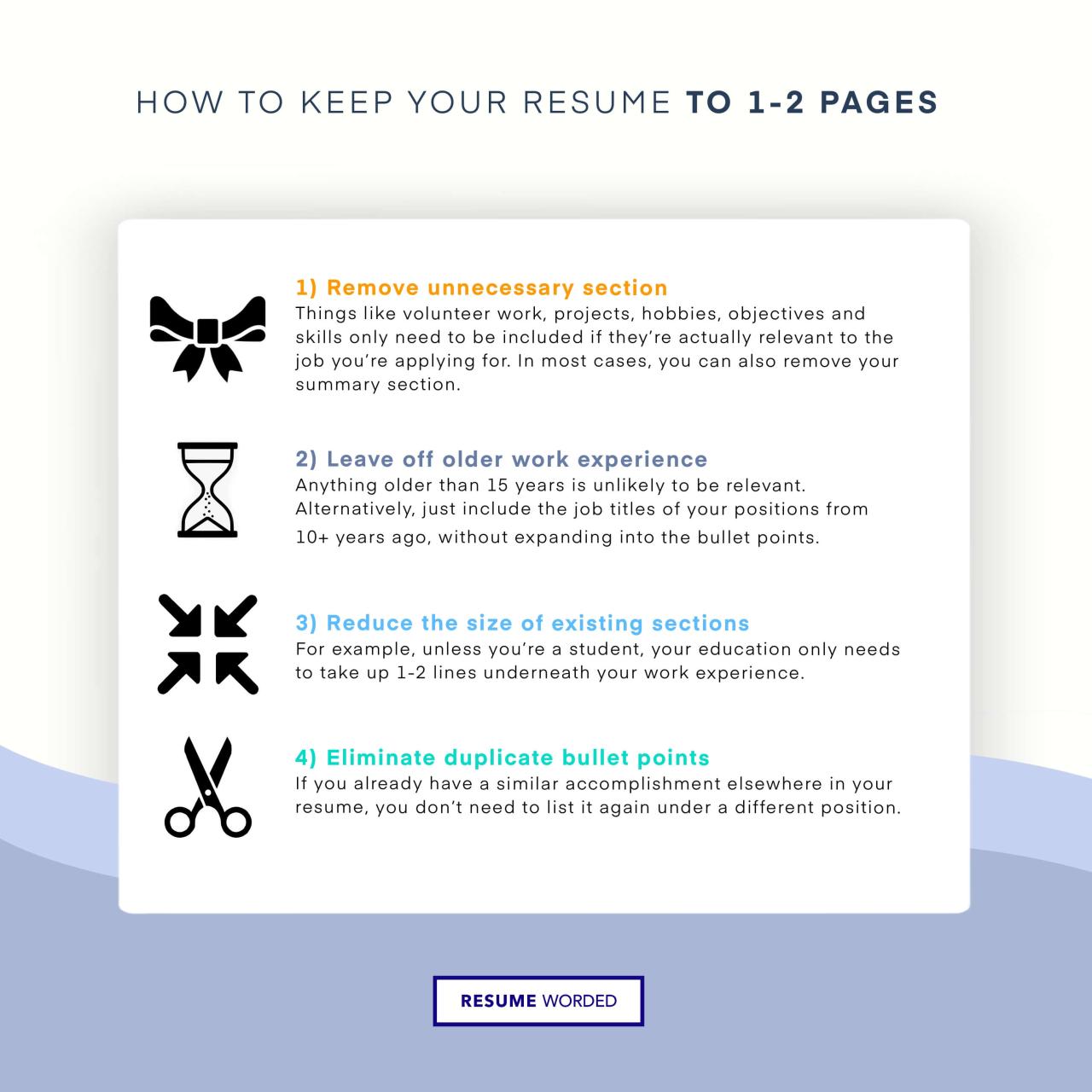
Creating a well-structured two-page resume is essential for presenting your professional background clearly and effectively. Proper organization ensures that recruiters can easily navigate your qualifications, achievements, and skills within the limited space. A logical flow and strategic use of layout elements can enhance readability and highlight your most pertinent information.An effectively organized resume divides content into distinct, easy-to-follow sections that allow the reader to quickly assess your suitability for a position.
This approach not only improves visual clarity but also ensures that each aspect of your professional profile receives appropriate emphasis. When designing a two-page resume, balancing comprehensive detail with conciseness is key, requiring thoughtful placement of information to avoid clutter while providing enough context to showcase your capabilities.
Organizing Content into Clear Sections
A structured two-page resume starts with a foundational layout that includes a series of well-defined sections: Contact Information, Professional Summary or Profile, Skills, Experience, Education, and Additional Sections such as Certifications, Volunteer Work, or Publications. Each section should be distinctly labeled with headers, making navigation intuitive.The Contact Information should be prominently placed at the top, including your name, phone number, email address, and LinkedIn profile or professional website if applicable.
Following this, a concise Summary offers a snapshot of your expertise and career goals, setting the tone for the rest of the document.The Skills section can be subdivided into categories such as Technical Proficiencies, Soft Skills, and Language Skills. Organizing these into a table with up to four columns allows for an efficient display of numerous skills without overwhelming the reader.
For example, one column may list programming languages, another software tools, a third soft skills like leadership and communication, and a fourth language proficiencies.Your Experience section should be arranged in reverse chronological order, detailing your roles, responsibilities, and notable achievements. Use bullet points to concisely describe each position’s duties and accomplishments, focusing on quantifiable outcomes whenever possible. For instance, stating that you “Led a team of 10 to increase sales revenue by 20% within six months” demonstrates impact.The Education section follows, listing degrees, institutions, graduation dates, and relevant coursework or honors.
Additional sections such as Certifications or Publications can be formatted similarly, using tables or bullet points to efficiently present supplementary qualifications or contributions.
Using an HTML Table Layout for Skills and Certifications
Tables are a valuable tool for organizing diverse information compactly and clearly. For skills, certifications, or technical proficiencies, a table with up to four columns optimizes space and enhances readability.An example layout can be as follows:
Technical Skills Certifications Languages Soft Skills Python, Java, SQL Certified Data Analyst English (Fluent), Spanish (Intermediate) Leadership, Problem-Solving MS Office Suite, Tableau Project Management Professional (PMP) French (Basic) Effective Communication, Adaptability
This format allows for the quick identification of relevant skills and credentials, making it easier for recruiters to match your qualifications with job requirements.
Listing Responsibilities and Achievements with Bullet Points
Within the Experience section, responsibilities and achievements should be presented using bullet points to enhance clarity and readability. Each bullet point should start with a strong action verb to convey your role actively and assertively.For example:
- Managed a team of 12 marketing professionals to develop and execute digital marketing campaigns, increasing online engagement by 35% over a year.
- Implemented a new customer relationship management system that reduced client onboarding time by 20%, leading to improved client satisfaction.
- Conducted market research that identified emerging trends, informing strategic decisions that contributed to a 15% growth in market share.
Using bullet points allows potential employers to quickly scan your contributions and accomplishments, emphasizing your capacity to deliver results. It is advisable to focus on quantifiable achievements, such as percentage increases, cost savings, or project completions, to substantiate your impact within each role.
Designing Effective Resume Sections
Creating well-structured and impactful resume sections is vital to capturing the attention of hiring managers and showcasing your professional strengths. Thoughtful organization and clear presentation of each section enable your qualifications to stand out and facilitate a quick understanding of your suitability for the role.
Each section of your two-page resume should serve a specific purpose, highlighting your value, skills, and experience in a way that aligns with your career objectives. Properly designed sections not only improve readability but also reinforce your professional narrative, making your application memorable and compelling.
Crafting a Strong Professional Summary
The professional summary is often the first element a potential employer encounters, making it crucial to craft a concise yet compelling overview of your qualifications. It should emphasize the value you bring to an organization and align with your career goals.
- Begin with a clear statement of your professional identity, such as your current role or area of expertise.
- Highlight your most relevant skills, achievements, and experiences that demonstrate your suitability for the targeted position.
- Express your career aspirations in a way that resonates with potential employers, indicating your motivation and long-term commitment.
- Keep the summary within 3-4 sentences to ensure it remains impactful and easy to scan.
“A well-crafted professional summary acts as your elevator pitch, summarizing your core competencies and career intentions in a compelling manner.”
Prioritizing Skills for Maximum Impact
Skills sections should be tailored to match the requirements of the specific roles for which you are applying. Proper selection and prioritization elevate your resume’s effectiveness by emphasizing your most relevant abilities.
- Identify key skills from the job description, including technical proficiencies, soft skills, and industry-specific capabilities.
- Arrange skills in order of importance, placing the most critical and in-demand skills at the top.
- Use a combination of categories, such as technical skills, language proficiency, and leadership abilities, to offer a comprehensive overview.
- Incorporate s that align with applicant tracking systems (ATS) to improve your resume’s visibility.
- Quantify skills where applicable, such as “Advanced proficiency in Excel” or “Fluent in Spanish and French.”
Formatting Work Experience Effectively
Work experience should be presented in a clear, impactful manner that highlights your achievements through action-oriented language and measurable results. Proper formatting ensures each role demonstrates your contributions convincingly.
- Start each entry with your job title, followed by the company name, location, and dates of employment.
- Use action verbs at the beginning of each bullet point to convey responsibility and proactive contributions, e.g., “Led,” “Developed,” “Optimized.”
- Include specific, quantifiable results to demonstrate your impact, such as increased sales figures, efficiency improvements, or successful project completions.
- Focus on relevant details to tailor your experience toward the job you’re applying for, avoiding unnecessary information.
- Utilize a consistent format and spacing for readability, ensuring that each experience entry is easy to scan quickly.
“Quantifiable achievements—such as increasing revenue by 20% or reducing processing time by 30%—serve as concrete evidence of your capabilities.”
Highlighting Education, Certifications, and Ongoing Training
The education section should be concise yet comprehensive, showcasing your academic background and continuous professional development. Placing emphasis on relevant credentials can significantly strengthen your candidacy.
- Start with your highest degree, including the institution, degree type, field of study, and graduation year.
- List certifications that are pertinent to the position, such as PMP, CPA, or language proficiency certifications.
- Include ongoing training or professional development courses that demonstrate your commitment to staying current in your field.
- For recent graduates or those with limited work experience, position this section prominently early in the resume.
“Including relevant certifications and ongoing education can differentiate you from other candidates who may have similar experience but lack specialized credentials.”
Optional Sections and Their Placement
Additional sections can enrich your resume by providing a broader picture of your professional profile. These optional sections should be strategically placed to enhance your core qualifications without overcrowding the document.
- Publications or research work can be listed after the work experience or education, especially if relevant to the role.
- Conference participation and presentations demonstrate industry engagement and can be placed after certifications or in a dedicated section if extensive.
- Volunteer work showcases leadership, community involvement, and transferable skills, ideally positioned after professional experience or in a separate section if substantial.
- Limit these sections to relevant and recent activities to maintain focus and conciseness.
“Strategically placing optional sections ensures they complement your main qualifications, adding depth without detracting from your core professional narrative.”
Content Optimization for a Two-Page Resume
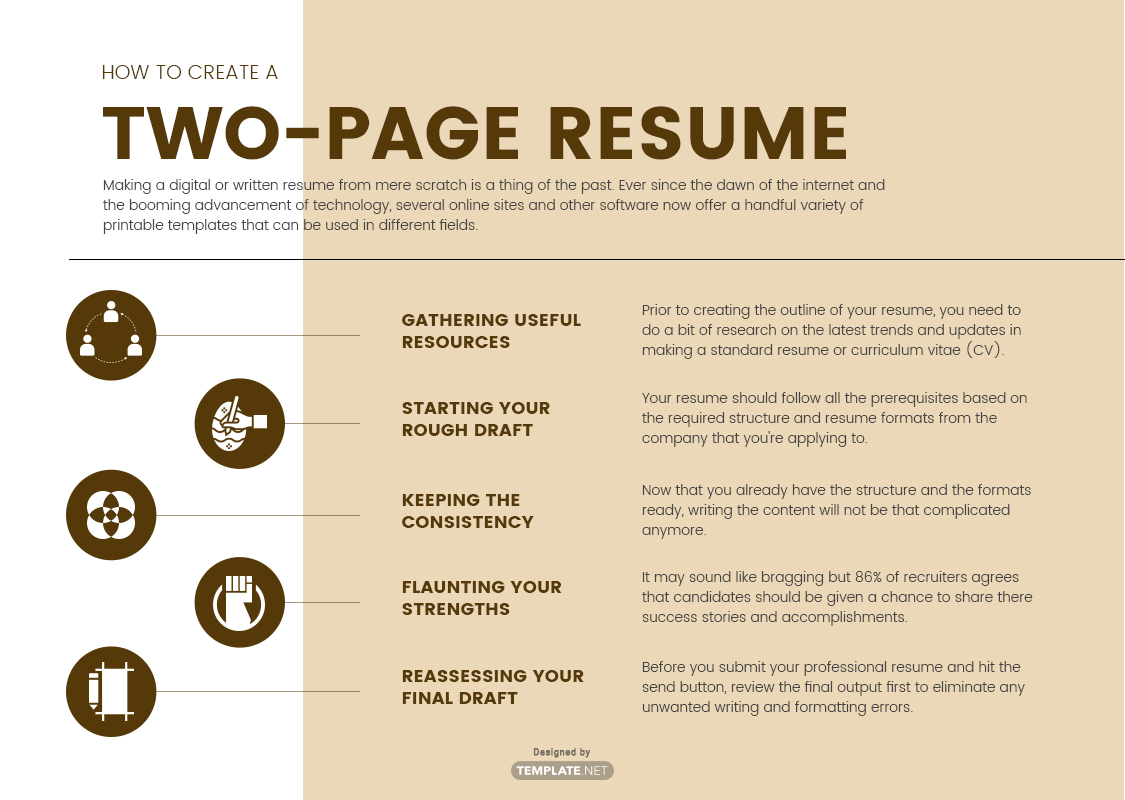
Effective content optimization is crucial in crafting a compelling two-page resume that highlights your professional achievements without overwhelming the reader. It involves carefully selecting and refining each description, skill, and accomplishment to be both concise and comprehensive, ensuring that every word adds value and aligns with your career goals. Proper optimization ensures that the resume remains engaging, easy to scan, and tailored to the specific roles you pursue, ultimately increasing your chances of standing out in competitive job markets.Achieving the right balance between brevity and detail across both pages requires strategic organization and precise language.
Every section must provide enough context to demonstrate your expertise, while avoiding unnecessary verbosity that can detract from the overall clarity. This process involves refining language, prioritizing impactful accomplishments, and structuring information in a way that guides the reader logically through your professional narrative.
Writing Concise Yet Comprehensive Descriptions
Crafting effective role descriptions demands clarity and focus. Each entry should succinctly Artikel your responsibilities, skills employed, and the results achieved. Use active verbs and quantifiable metrics to exemplify your contributions. For instance, instead of stating “Responsible for managing projects,” specify “Led a team of 10 to deliver a $2M project ahead of schedule, increasing efficiency by 15%.” This approach communicates competence and impact within limited space, capturing the employer’s attention.To ensure descriptions are both comprehensive and concise:
- Highlight key achievements and outcomes rather than listing every task.
- Use bullet points to break down complex information clearly.
- Prioritize recent and relevant experiences that align with the targeted role.
- Incorporate industry-specific s that match the job description for better ATS (Applicant Tracking System) compatibility.
Incorporate a balanced level of detail by focusing on the most significant aspects of each role, ensuring that each description supports your overall professional narrative without redundancy.
Sample HTML Table for Technical Skills and Tools
Technical skills and tools form a vital part of your resume, especially for roles requiring specific technical expertise. Organizing these skills into categories enhances readability and allows recruiters to quickly assess your technical proficiency. Below is an example of how to structure such data in an HTML table:
Use categorized tables to clearly display technical competencies, making it easy for employers to match your skills with the requirements of the position. Prioritize skills that are most relevant and up-to-date to reflect your current expertise.
| Category | Skills/Tools |
|---|---|
| Programming Languages | Python, Java, C++, JavaScript |
| Web Development | HTML, CSS, React, Angular, Node.js |
| Data Analysis | Excel, SQL, Tableau, Power BI |
| Project Management | Agile, Scrum, Jira, Trello |
| Cloud Platforms | AWS, Azure, Google Cloud Platform |
Showcasing Accomplishments, Awards, and Recognitions
Demonstrating your achievements through bullet points provides clear evidence of your capabilities and contributions. These points should be specific, measurable, and relevant. For example, instead of saying “Received recognition,” specify the award and its impact: “Awarded ‘Top Performer of the Year’ for exceeding sales targets by 25%, contributing to a 10% increase in team revenue.” Such statements add credibility and showcase your ability to deliver results.When organizing accomplishments:
- Use action verbs like “Led,” “Developed,” “Implemented,” or “Spearheaded” to convey leadership and initiative.
- Include quantifiable results to substantiate claims.
- Align accomplishments with the requirements of the job you are applying for.
- Place notable awards and recognitions prominently within the relevant professional experience or in a dedicated section if extensive.
Organizing this information effectively ensures a balanced presentation across both pages, emphasizing your strengths without cluttering the resume. Proper structuring of accomplishments helps recruiters quickly identify your top achievements, making your application memorable and impactful.
Visual Design and Layout Tips
Creating a visually appealing and well-organized resume is essential to capturing a recruiter’s attention and ensuring your key qualifications stand out. Proper attention to design elements enhances readability and professionalism, making your resume more effective in a competitive job market. Thoughtful layout and design choices should complement your content without overwhelming the reader, maintaining clarity and focus throughout the document.A well-structured visual layout facilitates smooth navigation through your resume, guiding the reader naturally from section to section.
It involves selecting appropriate fonts, spacing, margins, and subtle design elements that collectively reinforce your professionalism. When designing for both digital and printed formats, understanding responsive design principles ensures your resume maintains its integrity across different viewing platforms, ultimately supporting your job application success.
Font Choice, Size, and Spacing for Readability
Selecting the right typography is fundamental to creating an accessible and professional resume. The font should be clear, legible, and consistent throughout the document. Common choices include serif fonts like Times New Roman or Georgia for a traditional appearance, and sans-serif fonts like Arial, Calibri, or Helvetica for a modern look. These fonts are widely supported and provide excellent readability both on screens and in print.The font size must strike a balance between being large enough to read easily and compact enough to fit essential information within two pages.
Typically, 10 to 12 points is appropriate for the main text, while section headings can be slightly larger—around 14 to 16 points—to create visual hierarchy. Use bold or italics sparingly to emphasize key points without cluttering the layout.Spacing between lines (line height) should be set between 1.15 to 1.5 times the font size. Adequate line spacing improves readability by preventing the text from appearing crowded.
Margins of at least 0.75 to 1 inch around the page enable sufficient white space, creating a clean and uncluttered appearance that guides the reader’s eye smoothly through the content.
Layout Guidelines for Margins, Headers, and Section Separators
Consistent margins establish a professional frame for your resume, providing breathing space for the content and avoiding a cramped look. Uniform margins of 0.75 to 1 inch on all sides are recommended, ensuring the document appears balanced and aligned when printed or viewed digitally.Headers should be distinctive yet harmonious with the overall design. Use a slightly larger font size and bold formatting to differentiate section titles such as “Professional Experience,” “Education,” or “Skills.” Maintain uniformity in header styles throughout the resume to reinforce clarity and organization.Section separators such as horizontal lines, subtle shading, or increased spacing can visually distinguish different parts of your resume.
Light gray horizontal lines or subtle borders can be used sparingly between sections to delineate content without overpowering the design. Excessive use of separators can be distracting, so they should be employed thoughtfully.
Incorporating Subtle Design Elements to Enhance Visual Appeal
Subtle design elements can elevate the visual appeal of your resume by adding layers of sophistication and professionalism. These elements include the strategic use of color, icons, and typographical variations that don’t interfere with readability.For example, employing a single accent color—such as navy blue or dark gray—for headers, lines, or bullet points can create visual interest while maintaining professionalism. Use color sparingly; the goal is to guide the viewer’s eye rather than overwhelm the content.Icons can be used minimally to symbolize contact information, skills, or social media links, making the information easier to scan.
For instance, a small phone icon next to your contact number or a briefcase icon for work experience sections adds a modern touch without clutter.Typography variations—such as bold for headings, italics for subheadings or publication titles, and normal text for descriptions—help establish a clear hierarchy. Additionally, incorporating ample whitespace between sections and around text blocks prevents the resume from appearing dense, facilitating easier navigation.
Responsive Design Considerations for Digital and Printed Versions
Designing a resume that adapts well to both digital screens and printed formats ensures your document retains its professionalism regardless of how it’s viewed. For digital versions, especially PDFs, incorporating flexible layouts that avoid fixed widths or overly narrow columns enhances readability on various devices, from desktops to smartphones.Avoid using overly complex layouts or excessive images that may not render well across platforms.
Instead, prioritize simplicity with clean lines, straightforward fonts, and consistent formatting. Testing your resume’s appearance across different devices ensures that text remains legible, and formatting stays intact.For printed resumes, ensure that color choices and subtle design elements do not compromise clarity or produce visual clutter. Use high-contrast colors for text and background, and verify that all elements print clearly without smudging or bleeding.
Maintaining standard print margins and avoiding overly small font sizes ensures your printed resume is professional and easy to read.By adhering to these visual design principles, you create a resume that not only communicates your qualifications effectively but also demonstrates your attention to detail and professionalism to prospective employers.
Tailoring the Resume for Specific Roles
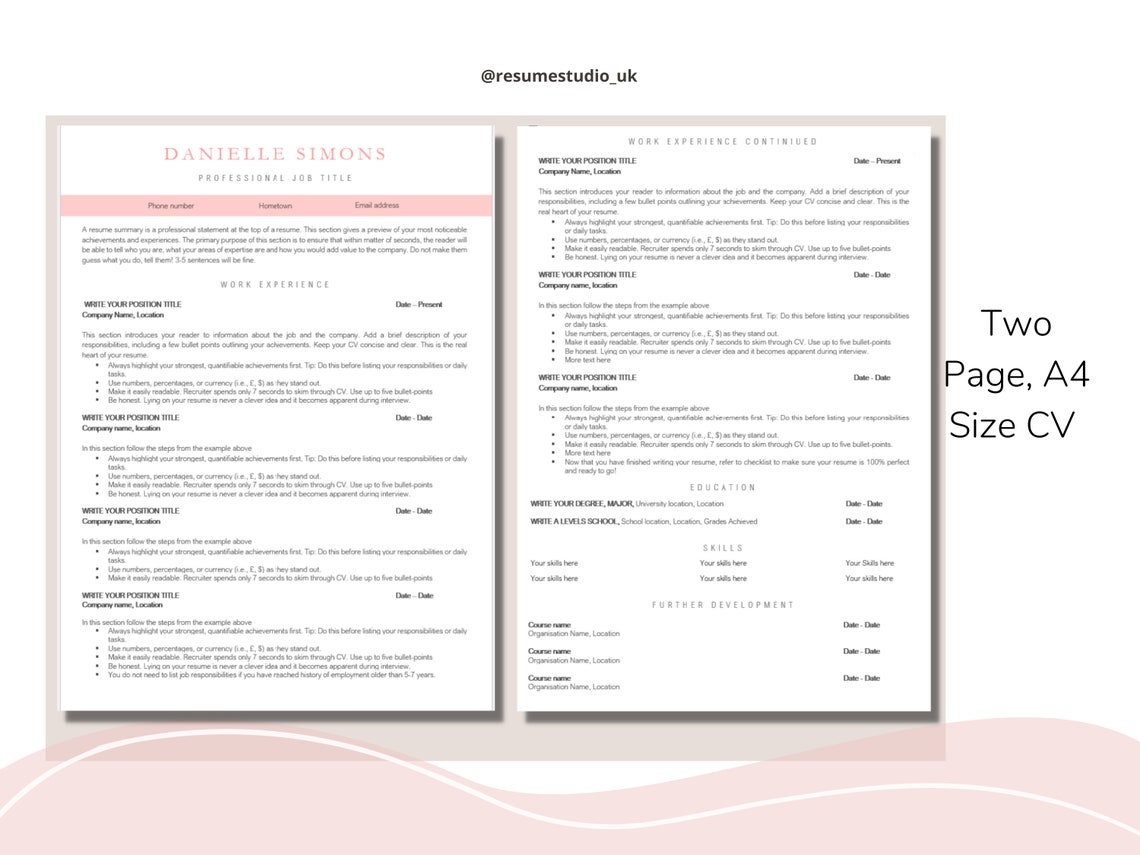
Crafting a resume that resonates with a particular industry or position significantly enhances the chances of capturing the attention of hiring managers. Customizing your resume ensures that your relevant skills, experiences, and qualifications are highlighted in a way that aligns with the specific requirements of each role. This focused approach demonstrates your understanding of the role and your genuine interest, making your application stand out among candidates with generic resumes.Adapting your resume for different roles involves a strategic review of the job description, research into industry-specific expectations, and selective emphasis on your most pertinent competencies.
It requires thoughtful editing to present a cohesive and targeted profile that convincingly matches the employer’s needs and expectations.
Matching Skills with Industry and Role Requirements
To effectively align your resume with a specific position, it is vital to compare your personal competencies against the skills highlighted in the job posting. A helpful method is creating a comparison table that lists required skills versus your corresponding experience or abilities. This visual tool allows you to identify gaps, strengths, and areas to prioritize in your resume.
| Required Skills for Role | Personal Competencies |
|---|---|
| Proficiency in project management software | Experienced with Asana, Trello, and Microsoft Project for task coordination and tracking |
| Strong leadership and team management | Led a team of 10 in an IT project, ensuring on-time delivery and stakeholder satisfaction |
| Data analysis and reporting | Skilled in Excel, Power BI, and Tableau for creating insightful dashboards and reports |
| Effective communication skills | Facilitated cross-departmental meetings and presented quarterly results to executives |
By visualizing required versus personal competencies, you can intentionally highlight key experiences that demonstrate mastery, while minimizing or rephrasing less relevant details to maintain focus.
Emphasizing Relevant Experience and Minimizing Less Pertinent Details
Prioritization is crucial when tailoring a two-page resume; you want to spotlight experiences that directly relate to the desired role while downplaying or omitting less relevant information. Strategies include:
- Reordering sections to position the most pertinent experience at the top of each section.
- Using targeted language that mirrors the terminology found in the job description, thus reinforcing your fit for the role.
- Condensing or removing older or unrelated positions that do not contribute meaningfully to your candidacy, especially if space is limited.
- Highlighting accomplishments that showcase skills aligned with the position’s core requirements, using quantifiable results whenever possible.
For example, if applying for a digital marketing role, prioritize your social media campaigns, projects, and data-driven advertising successes, while briefly mentioning earlier roles that are unrelated or less relevant. This tailored focus ensures the most compelling aspects of your background are immediately visible.
Adapting Tone and s to Match Job Descriptions
The language employed in your resume should reflect the tone and vocabulary of the target industry or role. Incorporating industry-specific terminology demonstrates familiarity and competence, making your resume more compatible with applicant tracking systems (ATS) and human reviewers alike.
“Utilize s from the job posting within your resume to improve ATS ranking and relevance. For example, if the role emphasizes ‘agile methodologies,’ ensure this phrase appears naturally in descriptions of your project management experience.”
Strategies include:
- Carefully analyzing the job description to extract frequently used s and phrases.
- Integrating these s seamlessly into your professional summaries, skills, and experience descriptions.
- Adjusting the tone to reflect industry standards—formal for finance or law, innovative and dynamic for tech startups, or compassionate and service-oriented for healthcare roles.
- Using action verbs and achievement-oriented language consistent with the role’s expectations.
This targeted adaptation not only improves the chances of passing initial screenings but also communicates your understanding of the industry language, thereby reinforcing your suitability for the position.
Finalizing and Polishing the Resume
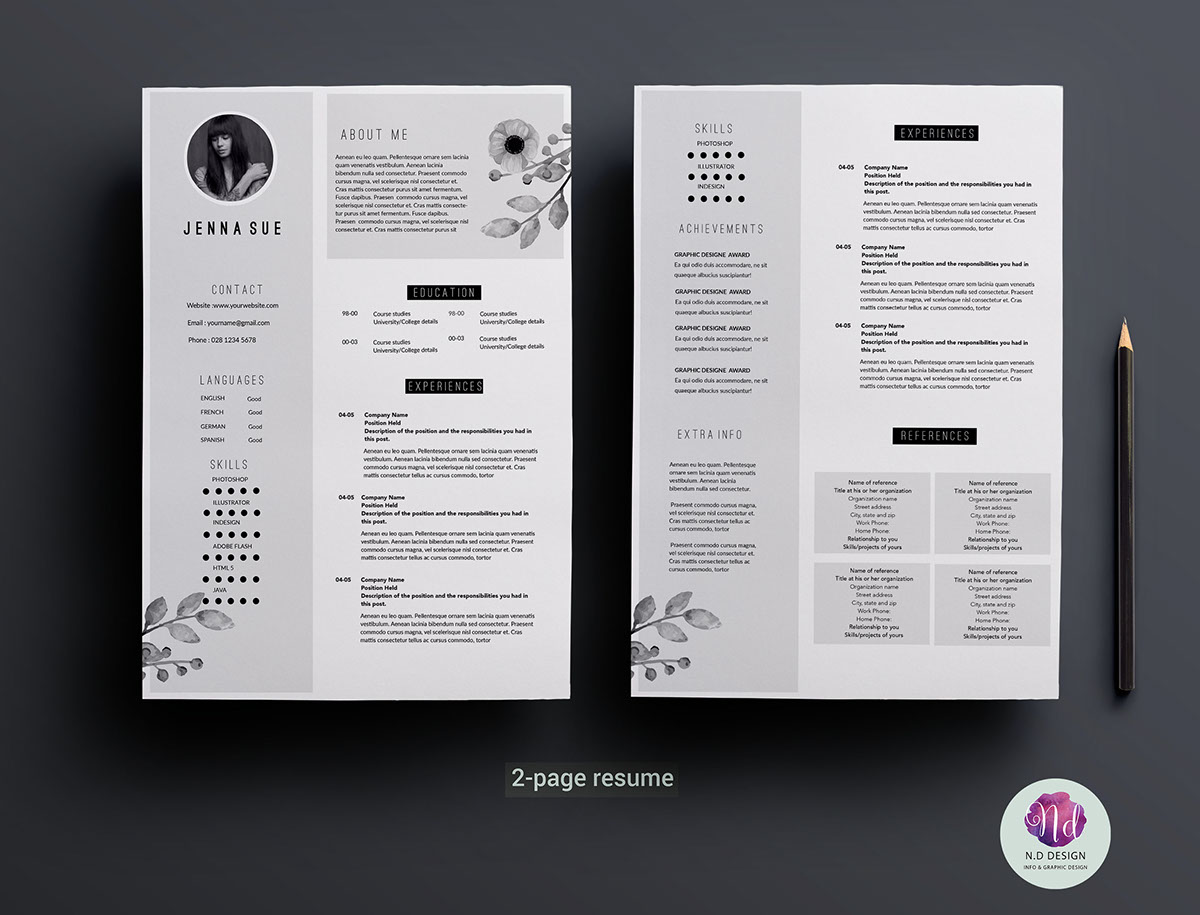
Creating a polished, professional resume involves meticulous review and refinement to ensure that it effectively communicates your qualifications while maintaining a high standard of presentation. This stage is crucial for identifying and correcting errors, enhancing clarity, and ensuring consistency across all sections. A well-finished resume not only reflects attention to detail but also demonstrates professionalism that can impress potential employers and increase your chances of securing interviews.Thorough finalization involves a systematic approach to proofreading, formatting, and review.
It is essential to scrutinize every element of your resume to eliminate errors, optimize content for clarity, and verify visual harmony. Properly formatted files that are saved in multiple formats ensure compatibility across different applicant tracking systems and professional review processes. Organizing a step-by-step review process helps maintain content integrity and layout consistency, ultimately resulting in a resume that stands out positively.
Proofreading, Consistency, and Error Elimination Checklist
An effective resume should be free of grammatical mistakes, typographical errors, and inconsistencies. The following checklist provides a comprehensive guide to finalize your document:
- Check for spelling, grammar, and punctuation errors using both automatic tools and manual review.
- Ensure uniformity in font styles, sizes, and colors throughout the document.
- Verify that headings, subheadings, and bullet points follow a consistent formatting pattern.
- Confirm that dates, job titles, and company names are accurate and formatted uniformly.
- Review the alignment and spacing of all sections to maintain visual balance and readability.
- Cross-verify contact information for accuracy, including email addresses and phone numbers.
- Check that all hyperlinks (if included) are functional and correctly linked.
- Read through the entire resume to ensure clarity, avoiding redundant or vague language.
Using a combination of spell-check tools and manual proofreading helps catch errors that automated systems might miss. It is also advisable to have a trusted peer or professional review your resume for an objective perspective and additional insights.
Formatting and Saving the File in Multiple Formats
Proper formatting and versatile file-saving practices are essential for presenting your resume professionally and ensuring accessibility. Different employers or applicant tracking systems may require specific file formats, making it important to prepare multiple versions of your resume:
- Save the primary file as a PDF to preserve layout integrity, prevent unintended editing, and ensure compatibility across devices and systems.
- Maintain an editable Word document (.docx) version for easy updates and customization tailored to specific roles.
- Use descriptive and professional filenames, including your name and the date, such as “JaneDoe_Resume_March2024.pdf”.
- Ensure fonts, spacing, and formatting are optimized before saving, avoiding hardcoded formatting that may not translate well across formats.
When saving, select the appropriate options: for PDFs, choose high-quality output settings; for Word documents, verify that the document is free of tracked changes or comments. Always review saved files to confirm that formatting remains intact and that no content has been inadvertently altered during the save process.
Step-by-Step Review Process for Layout and Content Integrity
A structured review process guarantees your resume maintains professional standards and accurately presents your qualifications:
- Print a hard copy of the resume for a physical review, which can help identify layout issues and readability concerns that may be less apparent on screen.
- Review the document on different devices (desktop, tablet, mobile) to ensure compatibility and visual consistency.
- Check each section systematically, verifying that headings, bullet points, and spacing are uniform and visually appealing.
- Assess the overall flow and logical order of information, ensuring that the most relevant details are prominently positioned.
- Read the resume aloud to catch awkward phrasing, repetitive language, or missing transitions that affect clarity.
- Use professional tools with built-in grammar and style checks to identify overlooked errors or inconsistencies.
- Solicit feedback from a trusted colleague or career advisor for an objective review and constructive critique.
This comprehensive process ensures that both content and layout are optimized, polished, and ready for submission, minimizing the risk of overlooking critical errors or inconsistencies.
Expert Tips for Maintaining Professionalism During Finalization
“A resume is often your first impression; attention to detail in finalizing your document demonstrates professionalism and respect for the hiring process.”
Keep in mind that clarity, accuracy, and consistency are the pillars of a professional resume. Use clean design principles, avoid clutter, and prioritize readability. Remember that a well-polished resume not only reflects your qualifications but also exemplifies your dedication and meticulousness—traits highly valued in any professional setting.”
Final Wrap-Up
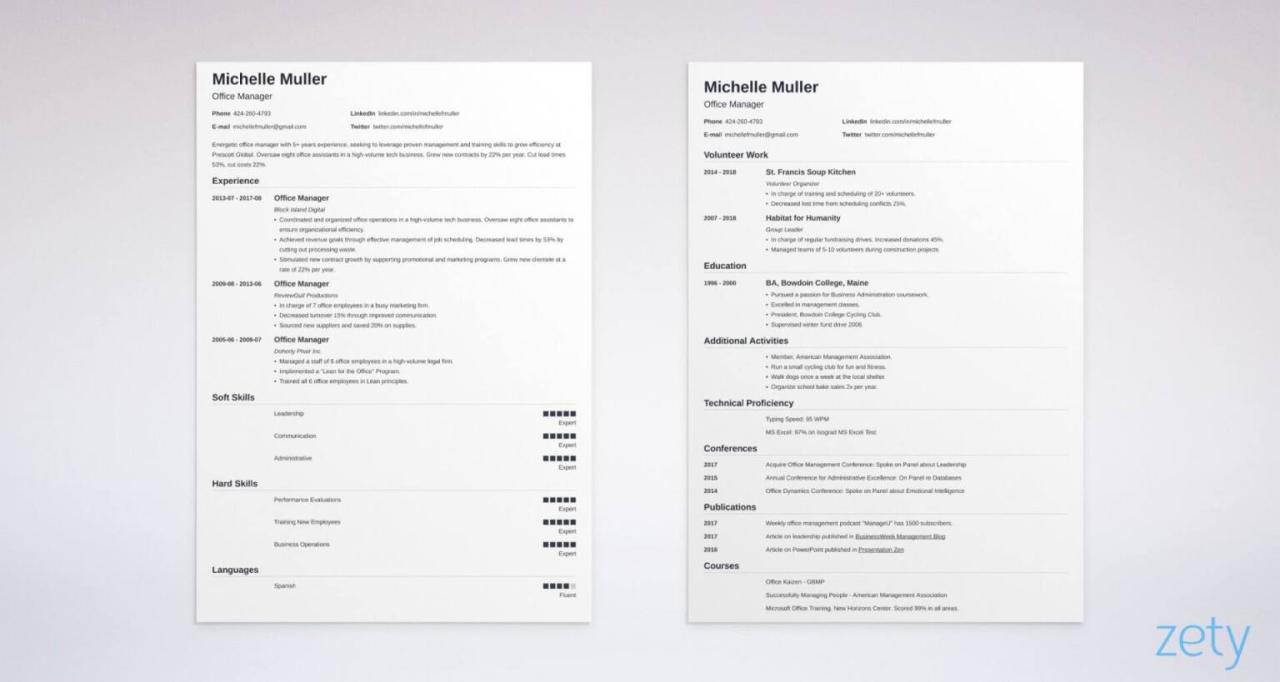
Summarizing the key points, crafting a two-page professional resume requires careful organization, strategic content selection, and effective design to balance detail with readability. When executed properly, it becomes a powerful tool to communicate your value to potential employers and secure your desired role.